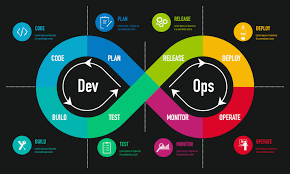
The Global DevOps Market: Size, Share, Trends, and Forecast (2025-2034)

The global DevOps market size was valued at USD 14.43 billion in 2024 and is poised for remarkable growth, with an expected CAGR of 25.50% during the forecast period of 2025-2034. One of the primary drivers for this growth is the increasing demand for faster software delivery, fueled by digital transformation, cloud adoption, and the need for scalable, secure, and high-quality applications across industries. By 2034, the market is projected to achieve an impressive valuation of USD 139.86 billion.

Market Overview
DevOps, a portmanteau of “Development” and “Operations,” represents a set of practices aimed at automating and integrating the processes of software development and IT operations. By fostering collaboration between these two traditionally siloed teams, DevOps enhances productivity, reduces development cycles, and ensures continuous delivery of high-quality software.

The demand for DevOps has been bolstered by the rapid adoption of cloud technologies, the rise of agile methodologies, and the increasing need for businesses to remain competitive in the digital era.

Market Size
The global DevOps market is undergoing exponential growth due to the shift toward cloud computing and the increasing reliance on digital platforms. In 2024, the market size was valued at USD 14.43 billion, and it is anticipated to grow over USD 139.86 billion by 2034. This rapid expansion is attributed to the rising adoption of hybrid and multi-cloud strategies, advancements in automation tools, and the proliferation of IoT-enabled systems.

Market Share
By Type:
Solutions:
DevOps solutions, such as CI/CD tools, monitoring platforms, and configuration management tools, dominate the market due to their critical role in enabling seamless workflows.
Services:
Professional services like consulting, implementation, and managed services are growing as organizations seek expertise in adopting and optimizing DevOps practices.
By Deployment Model:
Public Cloud: The most widely adopted model, thanks to its scalability and cost-efficiency.
Private Cloud: Preferred by industries prioritizing data security and compliance.
Hybrid Cloud: Gaining traction for its flexibility and ability to balance security with scalability.
By Organization Size:
Large Enterprises: Leading the market due to their need to streamline complex IT operations.
SMEs: Rapidly adopting DevOps to enhance efficiency and competitiveness.

Market Trends
1. Integration of AI and ML in DevOps
Artificial intelligence (AI) and machine learning (ML) are transforming DevOps processes by enabling predictive analytics, automating routine tasks, and enhancing anomaly detection.

2. DevSecOps on the Rise
The integration of security practices within the DevOps pipeline, known as DevSecOps, is becoming a critical trend to address cybersecurity challenges.

3. Growth in Containerization and Kubernetes
Containerization technologies like Docker and orchestration platforms like Kubernetes are driving flexibility, portability, and scalability in application development.

4. Focus on Continuous Delivery and Deployment
Organizations are increasingly adopting CI/CD pipelines to ensure rapid and reliable software updates, reducing time-to-market.

Market Analysis
Drivers
The growing emphasis on digital transformation across industries.
Increasing adoption of cloud computing and hybrid cloud models.
Rising demand for operational efficiency and cost reduction.
Restraints
High implementation and training costs associated with DevOps tools.
Resistance to cultural changes in traditional organizations.
Opportunities
Untapped markets in emerging economies.
Innovations in AI-powered DevOps tools.
Expansion of DevOps into non-IT industries such as healthcare and manufacturing.

Market Segmentation
By Tools
Development Tools: CI/CD platforms, version control systems, and testing tools.
Other Tools: Collaboration platforms, monitoring systems, and infrastructure automation tools.
By Industry Verticals
IT and Telecom: Leading the adoption curve due to rapid digitalization.
BFSI: Driving demand for secure and reliable DevOps solutions.
Healthcare: Using DevOps for efficient patient data management.
Retail: Leveraging DevOps for enhanced customer experiences.
Regional Analysis
North America: Dominates the market with advanced IT infrastructure and cloud adoption.
Europe: Experiences steady growth driven by stringent data regulations and digitalization.
Asia-Pacific: Emerging as a key player due to the rapid adoption of DevOps in India, China, and Southeast Asia.
Middle East & Africa: Gradual adoption with significant growth potential in cloud services.

Market Growth
The DevOps market is experiencing robust market growth at a CAGR of 25.50% during 2025-2034. Factors driving this growth include the rising demand for cloud-native applications, advancements in automation technologies, and the need for enhanced operational agility. The market’s ability to support scalable and secure applications makes it indispensable for modern businesses.

Recent Developments and Challenges in the Market
Recent Developments
Launch of AI-driven DevOps platforms by major players.
Increasing partnerships between cloud providers and DevOps vendors.
Surge in investments in containerization technologies.
Challenges
Managing the complexity of integrating DevOps with legacy systems.
Addressing the shortage of skilled DevOps professionals.
Balancing automation with human oversight.

Key Players in the Market
Leading companies in the global DevOps market include:

Amazon Web Services (AWS)
Microsoft Azure
Google Cloud Platform
IBM
Red Hat (IBM)
Docker
Atlassian
Chef
Puppet
GitLab
These companies are investing heavily in innovation, partnerships, and acquisitions to maintain their competitive edge.

Upcoming Challenges in Market
Security Concerns: Ensuring robust security in automated pipelines remains a challenge.
Cost Management: Addressing the high costs of tools and infrastructure.
Cultural Barriers: Overcoming resistance to change in traditional IT environments.

Competitive Landscape
The DevOps market is highly competitive, with established players and emerging startups vying for market share. Key strategies include:

Product innovation through AI and ML integration.
Strategic alliances with cloud service providers.
Expansion into emerging markets.

The global DevOps market is on an upward trajectory, revolutionizing how businesses develop, deploy, and maintain applications. With its ability to drive agility, efficiency, and collaboration, DevOps is becoming an essential component of modern IT strategies. As the market continues to grow, driven by technological advancements and increasing adoption across industries, businesses must embrace this transformative approach to stay competitive in the digital age.

Extruder Duty Helical Gearbox


The Extruder Duty Helical Gearbox under the established name JS Gears excel as the best extruder box manufactures. We have served thousands of industries with extruder duty gearbox. As the leading helical gearbox manufacturers, our client-base is very vast. Are you in need of a high-end extruder duty helical gearbox? We can provide you at the required quality at the stipulated time. Our name as the custom gearbox manufacturers go beyond the national boundaries. We also invite you to work along with one of the leading industrial gearbox suppliers so that you receive quality products at a cheap rate.

0

Helical Bevel Gearbox

Achieve the best power transmission with Helical Bevel Gearbox, crafted by leading helical bevel gearbox manufacturers. Engineered for efficiency and durability, our helical bevel gearmotors redefine performance standards. From compact designs to robust constructions, we cater to diverse industrial needs. As premier bevel gear suppliers in India, we ensure unmatched quality and reliability. Whether it is enhancing productivity or optimizing machinery, our gearboxes deliver precision with every revolution. Experience efficient integration and elevated performance with Helical Bevel Gearbox, your trusted solution for unparalleled power transmission. Upgrade your operations with the pinnacle of engineering excellence

0

How to Withdraw Money from Robinhood: A Step-by-Step Guide (2025)

In recent years, Robinhood has become a popular trading platform, known for driving the trend of commission-free trading. Robinhood has made it easy for anyone to deposit money to start investing and trading stocks, cryptocurrencies, and ETFs. But how do you withdraw money from Robinhood to spend it elsewhere? In this step-by-step guide, we’ll walk you through how to withdraw money from Robinhood on all platforms and transfer your cash to your bank account or debit card.


Can Money Be Withdrawn from Robinhood?
Yes, you can withdraw your money from Robinhood. You can transfer cash from Robinhood through two methods, either withdrawing money to your (1) bank account or (2) external debit card. Whatever method you choose, you can complete this withdrawal using the online web platform on your computer browser, or the iOS or Android apps.


If you don’t withdraw your cash on Robinhood, you will automatically earn a 1.5% annual percentage yield (APY) on your uninvested cash. Robinhood Gold members will earn a 5% APY on uninvested cash.

How to Withdraw Money from Robinhood to Bank?
If you choose to withdraw money from Robinhood to your bank account, you can do it on the web, iOS app, or Android app. There’s no fee for standard bank transfers which take 4 to 5 business days.


If you are using the app, you can also check whether your account qualifies for an instant transfer (withdrawal). If it does, the option will show up on the withdrawal page. Making an instant transfer to your bank is an app-only feature and cannot be done on the web. 


Beware: instant bank transfers will always incur a 1.5% fee that’s deducted directly from your withdrawal amount.


For withdrawals to your bank, there is a daily $50,000 withdrawal limit, with a transaction limit of 5 withdrawals per day.

How to Withdraw Money from Robinhood to Bank on the Web?
If you want to transfer money from Robinhood on the web, follow these steps:

Click Account in the top right corner of your screen, then select Transfers.
Select Transfer money.
Choose the account you want to withdraw money from, in this case, your Robinhood account.
Choose the bank account you want to transfer money to.
Enter the amount you’d like to withdraw.
Review and confirm the withdrawal amount and confirm any fees.
Click Transfer.
Currently, you cannot withdraw money by sending a wire transfer from Robinhood to your bank. However, you can send a wire transfer from your bank to Robinhood to deposit cash.

How to Withdraw Money from Robinhood to Bank on iOS App?
To transfer money from Robinhood on the iOS app, the process is slightly different. Follow these steps:

Open the Robinhood iOS app on your iPhone. 
Tap the Account icon (looks like a person), which is usually found in the bottom right corner of your screen.
Click Menu in the top left, which looks like three horizontal lines, often referred to as the “hamburger” icon.
Select Transfers from the list of menu options.
Tap on Transfer money.
In the “From” field, choose your Robinhood brokerage account, which is where you want to transfer money from.
For the “To” field, choose the bank account you want to withdraw money to.
Enter the amount you want to withdraw.
If your account qualifies, you’ll see Instant transfers eligible next to the external bank account. This is an in-app feature only. Instant withdrawals will cost you a 1.5% fee.
Tap Review and follow the on-screen prompts to confirm your withdrawal details and any fees. 
How to Withdraw Money from Robinhood to Bank on Android App?
Withdraw Money from Robinhood to Bank on Android App using the Android app can be done by following these steps:

Open the Robinhood app on your Android device. 
Click the Account icon (looks like a person) in the bottom right corner of your screen.
Tap the three horizontal lines in the top left of your screen to access the Menu.
Choose Transfers on the menu screen.
Select Transfer money to begin the withdrawal process.
For the “From” field, select your Robinhood brokerage account.
In the “To” field, choose the bank account you want to withdraw money to.
Enter the amount you want to withdraw.
For qualified external bank accounts, you’ll see “Instant transfers” next to your external bank account. This is an in-app feature only. Please note that instant withdrawals will incur you a 1.5% fee.
Click Review and follow the on-screen prompts to confirm your withdrawal details and any fees. 
How to Withdraw Money from Robinhood to Debit Card?
You can also withdraw money from Robinhood to your external debit card. On Robinhood, withdrawing to a debit card will incur a 1.5% fee, with a minimum fee of $1 and a maximum fee of up to $150. 

A Robinhood debit card withdrawal is instant, usually taking at most 30 minutes for a transfer to complete.


To complete a withdrawal from Robinhood to your debit card, you can follow these steps:-

Go to your Account, in the top right corner of your browser or bottom right of your app.
Select Transfers in the web dropdown menu, or the hamburger icon in the top left corner of your app.
Select Transfer money.
Choose the account you want to withdraw money from, in this case, your Robinhood account.
Choose the debit card you want to transfer money to. If you haven’t linked an external debit card, follow the Robinhood prompts to add a card.
Enter the amount you’d like to withdraw.
Review and confirm the withdrawal amount and confirm any fees.
Click Transfer.
How Long Does it Take to Withdraw Money from Robinhood?
If you have submitted a standard withdrawal from Robinhood to your bank, it will take around 4 to 5 business days for the money to show up in your account. If your external bank account qualifies for an instant transfer with Robinhood, it should show up immediately.  If you are transferring your Robinhood cash to a debit card, the transfer should be instant.

How Soon After Selling Stock Can I Withdraw My Money From Robinhood?
If you just sold stock or ETFs on Robinhood and wish to withdraw your money, you need to wait at least two days for your trade to settle. Stocks and ETFs typically have a settlement period of two trading days, after which your cash will be available for withdrawal.


If you are withdrawing to a bank account that is different from the ones you used to deposit cash from, then you be requested for additional information. These waiting periods will vary based on the time it takes Robinhood to review this information. This is meant to prevent any fraud or money laundering and is for your protection. 

Are There Fees to Withdraw or Transfer Money from Robinhood?
 

There are no fees for withdrawing money from Robinhood if you are transferring cash to your bank account. However, any instant withdrawals will incur a fee. Instant transfers to an external debit card will incur a 1.5% fee, with a maximum fee of $150. 

Can I Cancel a Robinhood Withdrawal?
You may be able to cancel a withdrawal made through Robinhood if you act quickly enough. To do this:

Go to your Account page (top right in the web browser or bottom right “person icon” in the app).
If you’re using the mobile app, tap the Menu icon (three horizontal lines) in the top left of your screen.
Select History. Find your withdrawal request.
Select the pending withdrawal and choose the Cancel Transfer option.
 

Sometimes, a withdrawal is processed immediately and you may not be able to cancel it. In these situations, we recommend getting in touch with Robinhood’s customer support team. 

 
Final Thoughts
Congratulations, now you’re fully equipped with the knowledge on how to withdraw money from Robinhood across different platforms.


Just remember, instant transfers and withdrawals on Robinhood will always cost a fee. Plan accordingly if you want to avoid this fee since standard bank transfers are free but require waiting a few business days for your cash to show up.


0

How Much You Can Send, Receive, and Withdraw on Cash App After Verification?

Cash App has become one of the most popular financial platforms, offering users a convenient way to send, receive, and withdraw money. While its basic features are accessible without verification, the true potential of Cash App lies in verifying your account. This article dives deep into the Cash App limits after verification, including sending, receiving, withdrawal, and borrowing limits.


Understanding Cash App Limits After Verification

Verification on Cash App requires providing your full legal name, date of birth, and the last four digits of your Social Security Number (SSN). Once verified, your limits for transactions expand significantly, giving you more flexibility in managing your finances.


Cash App Daily Limit After Verification

After verifying your account, the Cash App daily limit for sending money increases significantly compared to unverified accounts. For verified users, you can send up to $7,500 per day. This increase is a huge advantage for those who use Cash App for larger transactions.


For receiving money, there is no set daily limit. Verified users can receive unlimited funds, which is perfect for freelancers, small business owners, and anyone frequently handling incoming payments.


Cash App Weekly Limit After Verification


The Cash App weekly limit after verification is set at $7,500 for sending money. This limit resets every rolling seven days. If you hit your limit, you’ll need to wait for the next reset cycle to send additional money. Receiving money, as mentioned earlier, remains unlimited.


Cash App Withdrawal Limit

When it comes to withdrawing funds, Cash App allows you to withdraw money directly to your linked bank account or at ATMs. For verified accounts, the Cash App ATM withdrawal limit is $1,000 per day, $2,500 per week, and $10,000 per month. Keep in mind that Cash App may charge a $2.50 fee for ATM withdrawals unless you receive $300 or more in direct deposits each month, in which case the fee is waived.


Cash App Borrow Limit

One of the lesser-known features of Cash App is its borrowing option. The Cash App borrow limit varies depending on your account activity, direct deposit history, and other factors. Verified users can borrow between $20 and $200. To access this feature, ensure your account is active and consistently used for transactions.


How to Increase Cash App Limit?

If the current Cash App limits aren’t sufficient for your needs, there are steps you can take to further increase your Cash App limit:


Complete Account Verification

Ensure your account is verified by providing your full legal name, date of birth, and SSN.


Set Up Direct Deposits

Enabling direct deposits increases your credibility on the platform, potentially raising your borrowing and spending limits.


Build Transaction History

Regularly using Cash App for sending and receiving money demonstrates responsible account activity, which may result in increased limits.


Contact Cash App Support

If you require higher limits for specific purposes, reaching out to Cash App’s customer support team can sometimes yield results.


How Cash App Weekly Limit Resets?

The Cash App weekly limit reset follows a rolling seven-day schedule. For example, if you hit your limit on a Monday, the ability to send more funds will reset the following Monday. Monitoring your transaction history in the app can help you plan your payments around this schedule.


Benefits of Increasing Cash App Limits

Maximizing your Cash App limits opens up several benefits:

Higher Transaction Flexibility: With increased limits, you can handle larger transactions without interruptions.
Business Growth Opportunities: Unlimited receiving capacity makes Cash App an excellent tool for small businesses.
Access to Borrowing: Higher activity levels on your account can unlock the borrow feature.
 

Steps to Check Your Cash App Limit


To check your current Cash App limits:

Open the Cash App.

Navigate to your profile settings.

Review your sending, receiving, and withdrawal limits in the account settings section.

Understanding these limits ensures you can plan transactions without facing unexpected restrictions.


FAQs About Cash App Limits After Verification


1. What is the maximum amount I can send on Cash App after verification?

After verification, you can send up to $7,500 per week. This limit resets on a rolling seven-day basis.


2. How do I increase my Cash App limit?

To increase your limit, verify your account by providing your full name, date of birth, and SSN. Regular transactions and setting up direct deposits can further enhance your limits.


3. Is there a limit to how much money I can receive on Cash App?

No, verified accounts have no limit on the amount of money they can receive.


4. How does the weekly limit reset work?

The weekly limit resets every seven days from the date of your first transaction within that week.


5. Can I withdraw more than $1,000 per day from an ATM?

No, the Cash App ATM withdrawal limit for verified accounts is capped at $1,000 per day.


6. What is the Cash App borrow feature?

The borrow feature allows eligible users to borrow between $20 and $200. Eligibility depends on account activity, direct deposits, and transaction history.


Conclusion

By verifying your Cash App account, you unlock higher limits for sending, receiving, and withdrawing money. Whether you’re using Cash App for personal or business purposes, understanding these limits and how to increase them ensures you make the most of this versatile platform. From expanding your daily and weekly limits to utilizing the borrow feature, verified accounts offer a range of benefits that unverified accounts simply can’t match.


Crane Duty Helical Gearbox


Crane Duty Helical Gearbox is one of the excellent crane duty gearbox manufacturers and suppliers. We have supplied millions of crane duty helical gearbox to our clients all over the world. We have unique fame as the best custom gearbox manufactures among our clients. Hence, the number of orders we receive every month is enormous. As the renowned helical gearbox manufacturers, we can custom design gearboxes that suit your application, and it is the top point behind our success. As the leading industrial gearbox suppliers, we are well-equipped to meet all your demands and expectations. Get in touch with us and know as the best inline helical gearbox manufacturer how we can fulfill your requirements.

https://cranedutyhelicalgearbox.com/

0

0

Eco Global Pest Control

Eco Global Pest Control Melbourne is a trusted provider of pest control services in the Melbourne area. We specialize in termite control and home pest control, offering effective solutions to keep your property free from pests. Our team of experienced technicians is committed to providing quality service and ensuring the safety and well-being of our customers. With our environmentally friendly approach, we aim to minimize the impact on the ecosystem while effectively managing pest infestations. Whether you need help with termites, ants, rodents, or any other pests, we have the knowledge and expertise to address your concerns. Choose Eco Global Pest Control Melbourne for reliable and sustainable pest control solutions.

Best Water and Stain Repellent

Guard Industry’s Best Water and Stain Repellent is the most effective way to protect your surfaces from water, stains, and grime. This sophisticated product, designed for both indoor and outdoor usage, forms a protective layer that stops water and oils from infiltrating your materials, assuring long-term results. Guard Industry’s repellant is ideal for stone, cloth, wood, and concrete surfaces, keeping them looking fresh while retaining breathability. It’s quick to dry and easy to apply, making it ideal for patios, driveways, furniture, and other surfaces. Guard Industry offers outstanding protection, increasing longevity and retaining the attractiveness of your surfaces, making it the top choice for effective water and stain prevention.

0

piscoplastic

Pisco Plastic Industries, founded in 1982 and based in Vadodara, Gujarat, is a leading supplier of HDPE pipes and fittings. Initially facing resistance, the company grew to dominate 60% of the HDPE pipe market in South Gujarat due to persistence and hard work. Known for its high-quality products, Pisco Plastic Industries formed a key partnership with Reliance Industries in 2002 as an authorized distributor. Over time, the company has expanded its product offerings, continuously introducing new items to add value for its clients. For more information, visit their website at www.piscoplastic.in.


0

Blocksentinels

The Hidden Strategies of Meme Coin Development Revealed

Meme coin development requires more than just a clever name or viral appeal. Successful projects rely on a combination of strategic planning, community engagement, and innovative tokenomics. Choosing the right blockchain is the first step, balancing scalability, transaction costs, and ecosystem compatibility. Crafting a unique value proposition, even in the meme space, helps set the coin apart. Community-first initiatives, such as giveaways, interactive events, and transparent updates, build trust and excitement. Tokenomics, including supply distribution, burn mechanisms, and staking rewards, create lasting appeal. Finally, strategic marketing on social media platforms amplifies visibility and encourages organic growth. By blending creativity with a calculated approach, developers can unlock the full potential of meme coins in the competitive cryptocurrency landscape.

Visit now >>https://blocksentinels.com/meme-coin-development-company

Contact us:

Whatsapp : 81481 47362

Mail to : sales@blocksentinels.com  

Telegram : https://t.me/Blocksentinels

0