Launching new business software involves more than making an application available to employees. A successful deployment requires careful planning, technical preparation, data checks, employee communication and ongoing monitoring. Even a well-developed system can create operational problems if it is introduced without considering how people, processes and existing applications will be affected.
For German businesses, software deployment can be particularly challenging when new applications need to connect with established ERP, CRM, accounting, production or warehouse management systems. A poorly managed launch may lead to interrupted workflows, missing data, security concerns and employee resistance.
Choosing the right software deployment strategy helps businesses control these risks. Rather than switching everything at once, companies can introduce changes in manageable stages, test the system under realistic conditions and prepare employees before the new software becomes part of their daily work.
What Is a Software Deployment Strategy?
A software deployment strategy is the planned approach a business uses to release a new application, introduce an updated system or replace existing software. It determines when the software becomes available, who receives access first, how data is transferred and what happens if something goes wrong.
The appropriate approach depends on several factors, including application complexity, business size, system integrations, employee requirements and the potential impact of downtime.
For example, introducing a new internal reporting application may involve relatively little disruption. Replacing an ERP system used for purchasing, inventory, production and financial administration requires much more preparation.
A deployment strategy should address five essential areas:
- Technical readiness, including infrastructure, integrations and system performance.
- Data migration, covering accuracy, completeness and compatibility.
- Employee readiness, including training and access permissions.
- Operational continuity, ensuring essential business activities can continue.
- Recovery planning, providing a way to respond to deployment failures.
Treating these areas as part of one coordinated process reduces the likelihood of unexpected problems during launch.
Common Software Deployment Strategies for German Businesses
Different deployment methods offer different levels of control, flexibility and operational risk. Understanding their differences helps companies select an approach that matches their requirements.
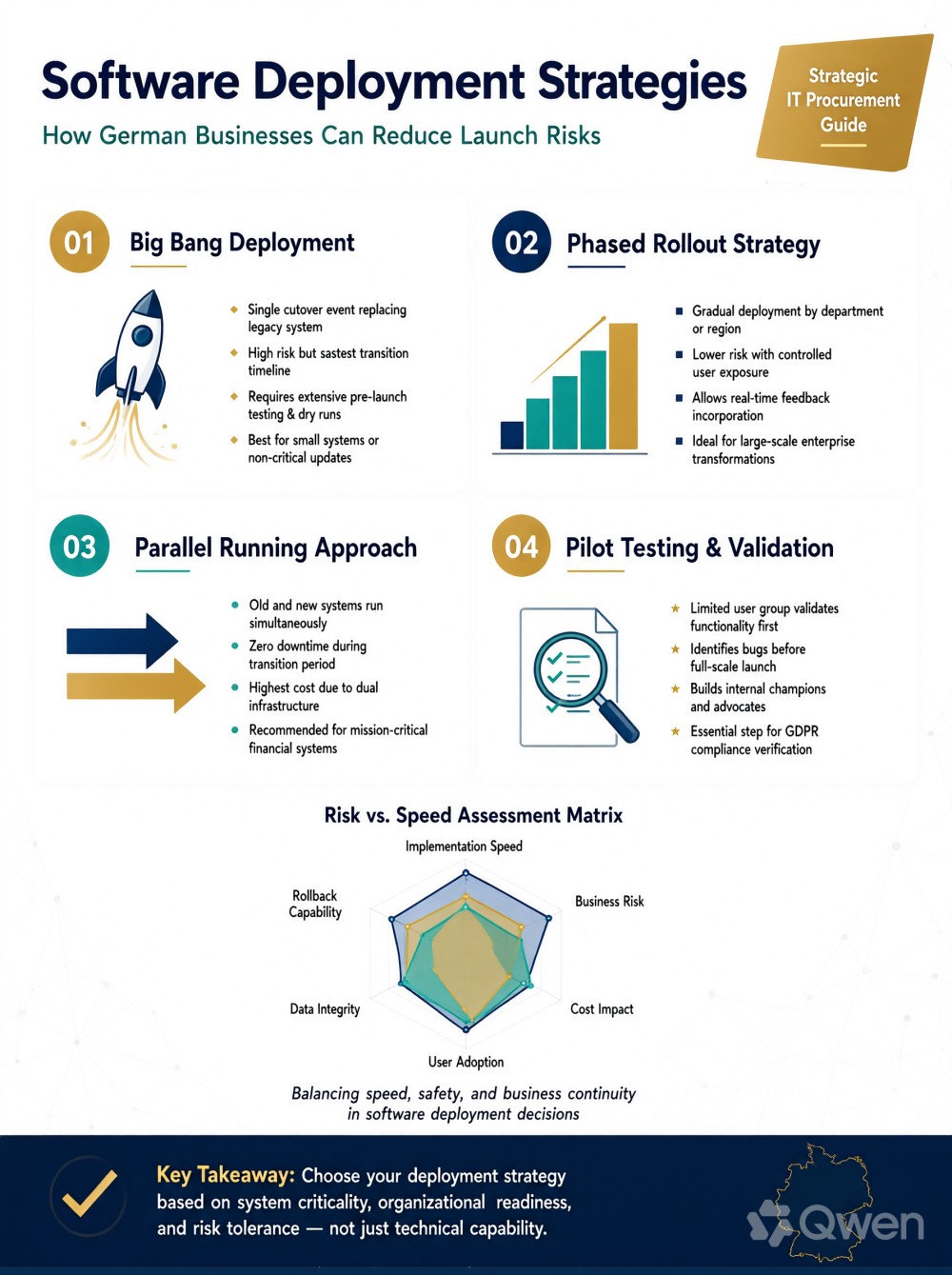
1. Big Bang Deployment
Big bang deployment involves replacing the existing system with the new application at a planned point in time. Employees move to the new software simultaneously, rather than using both systems over an extended period.
This approach can be suitable for smaller applications with limited integrations and straightforward data requirements. It can also reduce the complexity of maintaining two systems.
The main disadvantage is the level of risk concentrated around the launch date. If the new application experiences technical problems, employees may struggle to complete essential tasks.
Businesses considering this method should conduct extensive testing, prepare backups and establish a clear recovery procedure before switching systems.
2. Phased Deployment
Phased deployment introduces software gradually. A business might begin with one department, introduce selected features or move individual business processes before expanding access across the organisation.
For example, a German manufacturing company replacing its order management software could initially introduce the system to its sales team. Once order processing works reliably, the company could extend deployment to purchasing, warehousing and production planning.
This approach makes problems easier to identify and manage before they affect the entire organisation. It also gives employees time to become familiar with the new system.
The trade-off is that implementation may take longer, particularly when departments depend on shared information or interconnected workflows.
3. Pilot Deployment
A pilot deployment introduces the software to a small, representative group before the wider launch.
The pilot group should include employees who understand the relevant business processes and can provide useful feedback. Testing should cover ordinary activities as well as less common situations, such as incorrect data entries, approval delays and unusual customer requests.
A pilot is especially useful when introducing customised business software because it helps identify differences between the original requirements and actual working conditions.
Businesses should define clear success criteria before starting. These might include successful transaction processing, acceptable response times, accurate reporting and the completion of important workflows without manual workarounds.
4. Parallel Deployment
Parallel deployment involves running the existing and new systems simultaneously for a defined period.
Employees can compare outputs, verify important records and identify differences before the older application is discontinued.
This method is useful for applications involving financial records, payroll, customer information or other critical business data. For example, a company moving to a new accounting platform may compare transaction records and financial reports before relying.
The main challenge is additional workload. Employees may need to enter or verify information in both applications, so the business should establish how long parallel operation will continue and which system remains the official source of information.
How to Compare Software Vendors, Development Partners and Internal Development Teams
The organisation responsible for developing or implementing the software has a direct influence on deployment quality. Businesses should therefore evaluate their delivery options before committing to an implementation approach.
A software vendor generally supplies an existing product and manages its updates, support and configuration within the agreed service arrangement. This can be suitable when standard functionality meets most business requirements.
A development partner can provide greater flexibility when an application needs customised features, complex integrations or workflows designed around specific business operations. Companies considering professionelle Softwareentwicklung Hamburg may need to assess how well a development team understands their operational requirements and can support the application beyond its initial release.
Internal development teams offer direct organisational knowledge and closer control over technical decisions. They may be particularly valuable when software requires frequent changes or supports processes that are central to the company’s operations. Their availability, technical expertise and capacity to provide ongoing maintenance must also be considered.
When comparing these options, German businesses should evaluate:
- Technical experience: Does the team understand the required technologies, integrations and deployment environments?
- Business process knowledge: Can they translate operational requirements into practical software functionality?
- Testing capabilities: Do they have a structured approach to functional, integration, performance and security testing?
- Documentation: Will the business receive deployment instructions, technical documentation and user guidance?
- Post-launch support: Who will investigate problems, release fixes and manage future improvements?
- Ownership and access: Are source code, credentials, infrastructure access and intellectual property arrangements clearly defined?
The lowest initial development cost does not necessarily represent the best long-term choice. Businesses should consider the complete implementation and support requirements before selecting a delivery model.
Prepare Existing Systems and Data Before Deployment
Many deployment problems originate outside the new application itself. Existing systems may contain inconsistent records, outdated information, duplicate customer entries or unsupported integrations.
Before launch, businesses should review the applications and databases that will interact with the new software.
Start by identifying where important information is stored and how it moves between systems. A company introducing new CRM software, for example, may need to transfer customer records, sales histories, contact details and existing communication records.
Data migration should include validation rather than simply copying information. Sample records should be checked for accuracy, required fields should be mapped correctly, and duplicate or incomplete entries should be addressed.
Integration testing is equally important. A new application might work correctly on its own but fail when exchanging information with an existing ERP or accounting platform.
Businesses investing in individuelle Softwarelösungen Berliner should consider integration requirements early in the development and deployment process. This allows technical teams to identify dependencies before they become launch-day problems.
Test the Software Under Real Business Conditions
Testing should go beyond checking whether individual buttons, forms and features work correctly. The application must support the activities employees perform throughout their working day.
A useful testing programme includes several stages.
- Functional testing: Confirms that the software performs its intended tasks, such as creating orders, processing approvals and generating reports.
- Integration testing: Checks whether information moves correctly between connected applications and external services.
- Performance testing: Evaluates response times and system behaviour under expected workloads, including periods of increased activity.
- Security testing: Reviews authentication, access permissions, data handling and potential vulnerabilities.
- User acceptance testing: Allows employees and business representatives to confirm that the application supports real operational requirements.
Testing should also cover failure scenarios. What happens if an internet connection is interrupted during a transaction? Can an employee recover an unfinished order? Does the system prevent unauthorised users from accessing confidential information?
Recording issues, assigning responsibility and confirming that fixes work before launch creates a more reliable release process.
Protect Business Operations With a Rollback Plan
Even carefully tested software can experience problems after deployment. A rollback plan provides a controlled way to return to an earlier working environment if the new application causes serious disruption.
The plan should identify the conditions that justify stopping the deployment, the people authorised to make that decision and the technical steps required to restore the previous system.
Backups should be created before major changes, with restoration procedures tested rather than simply assumed to work. Businesses should also consider whether new transactions or records created after launch can be preserved during recovery.
For example, if a new inventory system produces incorrect stock quantities, the business may need to pause certain operations, investigate the affected records and restore reliable information before continuing.
Rollback is not always as simple as switching back to the previous application. Database structures, integrations and migrated records may have changed. For this reason, recovery procedures should be designed alongside the deployment plan.
Prepare Employees for the New Software
Technical readiness does not guarantee employee readiness. Staff members who do not understand the new system may make mistakes, avoid useful features or develop manual workarounds that undermine the intended improvements.
Training should reflect actual job responsibilities. Sales employees may need guidance on managing customer records, while finance teams require instructions for invoices, approvals and reporting.
Short practical sessions, demonstration environments, written instructions and internal support contacts can make the transition easier.
Businesses should also explain why the software is being introduced, which existing processes will change and where employees can report problems.
Feedback collected during the first few weeks can reveal usability issues that were not obvious during formal testing. It should be reviewed regularly, with recurring problems prioritised for correction.
Monitor Performance After the Launch
Software deployment does not end when employees receive access. The first weeks of operation are an important period for identifying technical issues and assessing whether the application is delivering the expected results.
Businesses should monitor indicators such as:
- Application availability and response times.
- Failed transactions and error messages.
- Integration and data synchronisation failures.
- Support requests and recurring employee difficulties.
- User adoption and completion of important workflows.
- Accuracy of reports and business records.
Assign clear responsibilities for monitoring these indicators. The IT team may investigate technical errors, while department managers can assess workflow problems and employee feedback.
A defined support process also helps employees report incidents with enough detail for investigation. Each issue should have an appropriate priority, an assigned owner and a clear resolution process.
For companies using cloud-based applications, monitoring should also cover service availability, access controls, backup arrangements and dependencies on external providers.
Account for German Data Protection and Security Requirements
Businesses operating in Germany should consider data protection and information security throughout software deployment, particularly when applications process personal information.
The General Data Protection Regulation (GDPR) establishes requirements for handling personal data. Depending on the application and its purpose, businesses may need to review data collection, access permissions, retention arrangements, processing responsibilities and security measures.
Security should not be treated as a final checklist immediately before launch. Access should be limited according to job responsibilities, sensitive information should receive appropriate protection, and system activity should be monitored where necessary.
Companies should also establish clear responsibilities when external development partners or cloud service providers are involved. Contracts, data processing arrangements and technical access should be reviewed according to the actual services and data involved.
Businesses planning individuelle Softwareentwicklung in Deutschland should address these considerations during requirements planning and technical design, rather than waiting until deployment is approaching.
Conclusion:
Make Software Deployment a Controlled Business Process
Reducing software launch risks requires more than choosing a deployment method. German businesses need a coordinated plan covering technical preparation, data migration, testing, employee training, security and post-launch support.
A phased or pilot deployment can provide greater control when software affects several departments, while parallel deployment may be appropriate for systems where accurate data comparison is essential. The right approach depends on the application’s complexity and the consequences of operational disruption.
Before setting a launch date, businesses should confirm that critical workflows have been tested, employees are prepared, backups are reliable and recovery responsibilities are clearly assigned.
The most practical next step is to create a deployment checklist based on the business processes the new software will support. This gives technical teams and management a shared view of outstanding risks and helps ensure that the launch is guided by operational readiness rather than an arbitrary deadline.