Venmo to Cash: How to Withdraw Money Step by Step

Venmo is quickly becoming one of the United States’ premier peers to peer payment services, enabling people to send money securely between peers. Once money has been deposited into your Venmo, the question arises as to “how to get money off Venmo?” Venmo makes money transfer easier by linking directly with bank accounts both in-app and online – the transfer between banks only requires a few clicks once linked.

Once linked, Venmo users can add funds directly through linking their debit or credit cards; either online or within their app – offering instant transfers or transfers within 1-3 business days depending on which option suits them better. Moreover, the Venmo’s Mobile Check feature makes depositing checks effortless even without access to bank account. Simply navigate to “Me” within the Venmo App, select “Mobile Check”, take photos of both sides before following instructions for verification process – once done you can view your balance under “Me”. Let’s begin and learn more about how to get money from Venmo.


How to Get Money from Venmo to Bank Account?

Venmo allows users to transfer money directly into their linked bank accounts. The process is quick and straightforward, although processing times for individual banks may take up to three days. Here is how you can transfer your Venmo account balance to your bank:

·         Open the Venmo App on your smartphone device.

·         To access the menu, tap on the three horizontal lines at the upper-left corner.

·         Choose “Transfer to Bank” under your Balance for easy withdrawal.

·         Venmo provides two transfer types, Standard and Instant.

·         Select the account associated with which you would like your debit cards linked.

·         Select Amount to Transfer and Click “Transfer.”

·         Once your transfer has been successfully completed, you will be notified. Please allow up to 1-3 working days for funds to appear in your account for standard transfers.


How to Get Money from Venmo to Debit Card?

Venmo provides an easier, faster method for sending money directly from your Venmo account to any Visa or Mastercard card directly, without going through traditional banking processes. Here is how to get money from Venmo to debit card:

·         Open the Venmo App and navigate to its “You” tab to open it.

·         Once your balance has been adjusted, select the “Transfer to Bank.”

·         Choose Instant Transfer and you can send money directly to your debit card.

·         Enter how much money you want to transfer and then confirm.

·         Transfer Fees While Instant Transfers may be faster, they usually incur an instant transfer fee (typically 1 % of the amount transferred). Keep this in mind when selecting your transfer option.


How to Get Money from Venmo Without a Bank Account?

Venmo users can still withdraw money using two methods of withdrawal:

·         Venmo allows users to send money directly to any debit card linked to their account, providing another means for receiving funds even if their bank is not traditional.

·         Venmo is offering its users a debit-card that works just like any other debit card – Venmo Mastercard allows users to make purchases or ATM withdrawals using their account balance in Venmo.

·         Venmo is an easy and secure way to pay someone you trust directly and anonymously. By withdrawing money directly from their bank account and giving it directly back, Venmo provides both direct and informal ways of collecting your payment.


How to Transfer Money from Venmo to Cash App?

Venmo money can easily be transferred into Cash App if your debit or bank card is linked, once in your linked bank account they will appear automatically as funds in Venmo and you can transfer them over.

·         Transferring Funds from Venmo to Your Bank Account or Debit Card: Use these instructions to securely move money directly from Venmo into your bank account or debit card.

·         Add funds to Cash App quickly by opening Cash App, tapping the banking icon, selecting “Add Fund”, linking your bank account with Cash App and sending the money.


Why Won’t Venmo Let Me Transfer Money to My Card?

Venmo provides several options for withdrawing your money without incurring fees, such as:

·         As previously discussed, funds transfers between linked accounts are free and may take between 1-3 business days to complete.

·         the Venmo card, you can withdraw cash from any ATM in the Allpoint network free of any fees; Venmo can even provide you with a list of ATMs near your location.

·         Venmo will not allow me to transfer money directly into my card account.

·         Venmo may prevent you from transferring funds onto your card for various reasons. Below are a few common scenarios:

·         Check if your Venmo account is linked correctly with your debit card.

·         Venmo will verify both your bank account information and debit card. Double check all details are accurate before proceeding with this verification process.

·         Transfers may fail if you do not have enough funds in your Venmo Account.

·         There may be an intermittent issue with Venmo servers; in such an instance, Venmo Support may assist.


How to Get Money Off Venmo Without Card?

Venmo provides you with the ability to withdraw money even without having a card associated with it. Here is how to get money off of Venmo without card:

·         Link your bank account, and send funds through standard transfer for free.

·         Apply for a Venmo Debit Card now to directly access your funds.

·         If you do not possess a debit-card, money can still be sent via direct deposit to someone who does have one and then handed back out in cash form to you.


How to Get Money Off Venmo Account?

Transferring money from Venmo is easy. Just select your payment method of choice: Venmo cards, linked bank accounts or debit cards are all options you have for accessing your funds instantly or over time – although debit card transfers incur a minimal transaction fee while bank account transfers remain free and take longer.


FAQ

How long does it take to get money off Venmo?

Your exact delivery timeline depends on which payment method you select; standard bank transfers take between 1-3 days while instantaneous debit card transfers can happen almost instantaneously at an additional fee.


Can I get money off Venmo without a bank account?

Transferring money can be done using either debit or credit cards; alternatively, give it to someone to withdraw for you.


Why is Venmo not letting me transfer money to my bank account?

Venmo may have not completed their verification process or this could be caused by other circumstances.


How do I get money out of Venmo if I do not have a debit card?

Venmo allows you to send money directly into either the bank account linked with Venmo or to another individual who will then withdraw it on your behalf.


Can I transfer money from Venmo to Cash App?

Money cannot be transferred directly from Venmo into Cash App; however, funds may first be sent from Venmo into one or more of your linked bank accounts before being deposited in CASH App.

How to Move Money on Venmo: A Comprehensive Guide

Venmo has become one of the most popular peer-to-peer (P2P) payment apps, allowing users to send and receive money quickly and conveniently. Whether you’re paying friends, splitting a bill, or transferring money to your bank account, Venmo offers various options to suit your needs. In this guide, we will cover everything you need to know about how to transfer money on Venmo effectively.

Venmo Money Transfer App
Venmo is a mobile payment service owned by PayPal that enables users to transfer funds using their smartphones. The app provides a seamless experience, allowing users to send payments instantly through their linked bank accounts, debit cards, or credit cards. With Venmo, users can also make purchases at participating merchants.

Key Features of Venmo
·         Instant Transfers: Send and receive money instantly.

·         Social Integration: Share payment details with friends.

·         Bank Transfers: Move money to your bank with ease.

·         Security: Uses encryption and authentication for secure transactions.

·         Venmo Debit Card: Pay at retailers and withdraw cash from ATMs.

Venmo Money Transfer to Bank Account
Transferring money from Venmo to a bank account is a straightforward process. Follow these steps to ensure a hassle-free transaction:

Steps to Transfer Money from Venmo to Your Bank
1.      Open the Venmo App and log into your account.

2.      Tap on the “Me” tab at the bottom of the screen.

3.      Select “Add or Transfer” under your balance.

4.      Enter the amount you want to transfer.

5.      Choose the preferred transfer speed:

o    Instant Transfer (subject to a fee).

o    Standard Transfer (free, takes 1-3 business days).

6.      Select your bank account as the transfer destination.

7.      Confirm the transaction by tapping “Transfer”.

Once the transfer is complete, you’ll receive a notification confirming the transaction.

Venmo Money Transfer Limit
Venmo imposes certain transaction limits to ensure security and compliance with financial regulations.

Venmo Transfer Limits for Personal Accounts
·         New Users (Unverified): $299.99 per week.

·         Verified Users:

o    Person-to-Person Payments: Up to $4,999.99 per week.

o    Bank Transfers: Up to $19,999.99 per week (individual transactions limited to $5,000).

To increase your Venmo limit, verify your identity by providing your full name, date of birth, and social security number within the app.

Venmo Money Transfer Fee
Venmo offers both free and paid transfer options depending on how quickly you want to access your funds.

Venmo Fees for Transfers
·         Standard Bank Transfer (1-3 business days): Free

·         Instant Transfer to Bank/Debit Card (within minutes): 1.75% fee (minimum $0.25, maximum $25 per transfer).

·         Credit Card Payments: 3% fee when sending money using a credit card.

To avoid unnecessary charges, use standard transfers whenever possible.

How to Transfer Money from Venmo to Bank without Fee
To move money from Venmo to your bank without incurring a fee, follow these steps:

1.      Select “Standard” Transfer Option: This method takes 1-3 business days but is completely free.

2.      Link a Bank Account Instead of a Debit Card: Bank transfers are free, while debit card instant transfers have a fee.

3.      Avoid Using Credit Cards: Sending money using a credit card incurs a 3% fee, so use your Venmo balance or linked bank account instead.

By following these best practices, you can maximize your Venmo limit without incurring unnecessary fees.

How to Transfer Money from Venmo to Debit Card
If you need instant access to funds, transferring money from Venmo to a debit card is a great option.

Steps to Transfer Money from Venmo to a Debit Card
1.      Open the Venmo app and go to your balance.

2.      Tap “Add or Transfer”.

3.      Enter the amount you want to withdraw.

4.      Select “Instant Transfer”.

5.      Choose your linked debit card.

6.      Confirm the transaction and tap “Transfer”.

The money should appear in your debit card’s associated bank account within minutes. Note that this service incurs a 1.75% fee.

Conclusion
Venmo offers a convenient and secure way to send and receive money. Whether you’re transferring funds to a bank account or debit card, understanding Venmo’s fees, limits, and best practices can help you make the most of the app. By choosing standard bank transfers and avoiding unnecessary fees, you can efficiently manage your finances using Venmo.

FAQs
1. How long does it take to transfer money from Venmo to a bank?
·         Standard transfers take 1-3 business days.

·         Instant transfers arrive within minutes but incur a fee.

2. What is the Venmo instant transfer fee?
·         1.75% of the transferred amount, with a minimum fee of $0.25 and a maximum of $25.

3. Can I transfer money from Venmo without a fee?
·         Yes, use the standard bank transfer option (takes 1-3 business days).

4. What are Venmo’s daily and weekly limits?
·         Person-to-person payments: Up to $4,999.99 per week (for verified users).

·         Bank transfers: Up to $19,999.99 per week, with individual transactions limited to $5,000.

5. How do I increase my Venmo transfer limit?
·         Verify your identity by providing your full name, date of birth, and Social Security number within the app.

Why Won’t Venmo Accept My Visa Gift Card? Here’s the Fix

Venmo is a widely used digital wallet that allows users to send and receive money seamlessly. However, many users encounter issues when trying to use a Visa gift card on Venmo. If your Visa gift card was declined on Venmo, you are not alone. In this guide, we will cover why this happens and how to resolve it.

Why is My Visa Gift Card Declined on Venmo?
There are several reasons why a Visa gift card may be declined on Venmo, including:

1.      Insufficient Funds – Venmo may attempt a small authorization charge, leading to a decline if there are insufficient funds.

2.      Incorrect Card Information – Entering incorrect card details, such as card number, expiration date, or CVV, can result in a decline.

3.      Zip Code Issues – Some Visa gift cards require a registered zip code before they can be used on Venmo.

4.      Venmo’s Restrictions on Prepaid Cards – Venmo accepts prepaid cards, but some cards may not be supported.

5.      Fraud Prevention Measures – If Venmo detects unusual activity, it may block the transaction.

6.      Card Not Supported for Transfers – Some Visa gift cards do not allow transfers or payments through digital wallets.

Vanilla Visa Gift Card Declined on Venmo
If your Vanilla Visa gift card was declined on Venmo, it might be due to one of the following reasons:

·         The card is not activated.

·         The card does not support online transactions.

·         There is no zip code registered for the card.

·         The funds are insufficient to cover the payment.

How to Fix Vanilla Visa Gift Card Issues on Venmo
1.      Ensure the Card is Activated – Visit the official Vanilla Visa website to check the card’s activation status.

2.      Register a Zip Code – Some cards require a zip code for online transactions.

3.      Check the Balance – Confirm that the card has enough funds for the transaction.

4.      Try a Different Card – If the card is repeatedly declined, use another prepaid card that is compatible with Venmo.

Visa Gift Card Zip Code Venmo – How to Register a Zip Code
Many prepaid gift cards require a registered zip code before they can be used for online purchases. If Venmo declines your Visa gift card due to a missing zip code, follow these steps:

1.      Visit the Issuer’s Website – Find the website printed on the back of your card.

2.      Register Your Card – Look for an option to add a billing address or zip code.

3.      Save the Information – Ensure the zip code is linked to your card.

4.      Retry Adding the Card to Venmo – After registering the zip code, try adding the card again.

How to Add a Visa Gift Card to Venmo Without a Zip Code
If your Visa gift card does not have a registered zip code, here’s what you can do:

·         Try Adding the Card Without a Zip Code – Some Visa gift cards do not require a zip code and work without issues.

·         Contact the Card Issuer – Some providers allow you to register a zip code over the phone.

·         Use the Card Elsewhere – If Venmo does not accept the card, consider using it for other online purchases.

What Prepaid Cards Work with Venmo Instant Transfer?
Venmo allows instant transfers to eligible prepaid cards, but not all prepaid cards are supported. Here are some prepaid cards that generally work with Venmo’s instant transfer feature:

·         Visa Prepaid Cards (if they support instant transfers)

·         Mastercard Prepaid Cards (issued by major banks)

·         American Express Prepaid Cards

·         Discover Prepaid Cards

To check if your prepaid card is eligible for instant transfer, try adding it to Venmo and selecting it for an instant transfer. If it’s not supported, you may receive an error message.

Should I Link My Bank Account or Debit Card to Venmo?
If you are deciding between linking a bank account or a debit card to Venmo, consider the following:

Linking a Bank Account
✅ No fees for standard bank transfers
✅ More secure and reliable
✅ Required for transferring large amounts
❌ Standard transfers take 1-3 business days

Linking a Debit Card
✅ Allows for instant transfers
✅ Convenient for quick transactions
❌ Instant transfers incur a fee (1.75% per transaction)

If you frequently transfer money and want to avoid fees, linking a bank account is the best option. However, if you need fast access to funds, using a debit card is preferable.

Conclusion
If your Visa gift card is declined on Venmo, it could be due to zip code issues, insufficient funds, or Venmo’s restrictions on certain prepaid cards. To resolve the issue, make sure your card is activated, has sufficient funds, and is registered with a zip code if necessary. If the problem persists, consider using a different payment method.

FAQs
1. Can I use a Visa gift card on Venmo?
Yes, but only if the card supports online transactions and has a registered zip code.

2. Why is my Vanilla Visa gift card declined on Venmo?
Your Vanilla Visa gift card may be declined due to activation issues, missing zip code registration, or insufficient funds.

3. How do I register a zip code for my Visa gift card?
Visit the card issuer’s website and enter a zip code to register it for online transactions.

4. What prepaid cards work with Venmo instant transfer?
Visa, Mastercard, American Express, and Discover prepaid cards that support instant transfers are usually accepted.

5. Is it better to link a bank account or a debit card to Venmo?
A bank account is better for avoiding fees, while a debit card allows instant transfers.

0

How Much Money Can You Send on Venmo Without Verification?

Venmo has become a trusted and convenient platform for transferring money, whether you’re splitting dinner bills, paying for a service, or sending funds to family and friends. However, there are limits to how much money you can send or receive on Venmo, depending on various factors. In this comprehensive article, we’ll dive into Venmo limits, including the maximum amounts you can send, receive, and transfer.

Understanding Venmo Limits

Venmo sets limits on transactions to ensure security and regulatory compliance. These limits vary based on whether your account is verified and the type of transaction you’re making.

Venmo Limits for Unverified Accounts

For accounts that have not completed identity verification, Venmo applies stricter restrictions:

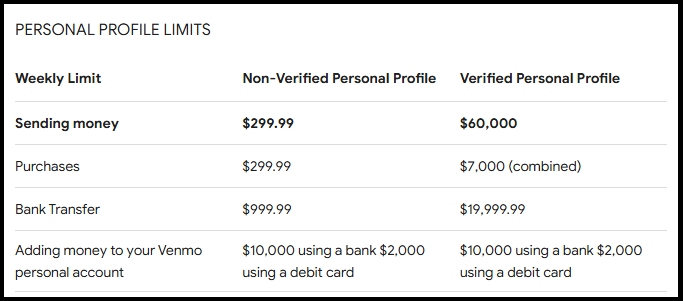
Weekly Sending Limit: $299.99
Weekly Receiving Limit: None explicitly stated, but limited by the sender’s limit.
Venmo Card Limit: $400 for ATM withdrawals, purchases, and cashback.
Venmo Limits for Verified Accounts

By verifying your identity, you unlock higher limits. Verified accounts allow for:

Weekly Sending Limit: Up to $60,000
Venmo Daily Max: No specific daily max, but subject to weekly caps.
Bank Transfer Limit: Up to $19,999 per week ($5,000 per transaction).
How Much Can You Send on Venmo for Free?

Using Venmo to send money for personal transactions is free when linked to a bank account or debit card. However, certain limits apply:

Peer-to-Peer Payments: The maximum amount depends on your verification status, with verified users able to send up to $60,000 weekly.
Venmo Daily Limits: While Venmo does not enforce daily caps, weekly limits still apply.
What’s the Most Money You Can Send on Venmo?

The maximum amount you can send on Venmo varies based on transaction types:

Person-to-Person Payments:
Unverified accounts: $299.99 weekly.
Verified accounts: $60,000 weekly.
Business Payments: Higher limits may apply for Venmo Business accounts.
Bank Transfers:
Individual transfers max out at $5,000.
Weekly bank deposit limits total $19,999.
Venmo Deposit Limits

Venmo also sets limits for deposits made via direct deposit or bank transfers:

Direct Deposit: Up to $50,000 per transaction, depending on the sender’s payroll system.
Bank Transfers: As noted, $5,000 per transfer or $19,999 weekly.
How to Increase Your Venmo Limits

To enjoy higher limits on Venmo, complete the following steps:

Verify Your Identity:
Provide your full name, address, date of birth, and Social Security Number (SSN).
Submit supporting documentation if required.
Link a Bank Account or Debit Card: Linking your financial accounts increases functionality and may enhance limits.
Avoiding Fees and Maximizing Transfers

While Venmo is free for most peer-to-peer transfers, be mindful of additional charges:

Credit Card Payments: A 3% fee applies.
Instant Transfers: 1.75% fee (minimum $0.25, maximum $25 per transfer).
To send the most money on Venmo without fees, use a verified account linked to a bank or debit card.

Venmo Limits for Businesses

For business accounts, Venmo offers customized limits:

Weekly Transaction Limits: These vary by business type and usage history.
Venmo Daily Max: Typically higher than personal accounts.
Business owners should contact Venmo directly for specific details about increasing limits.

FAQs about Venmo Limits

1. What’s the maximum amount you can Venmo at once?

For person-to-person payments, verified accounts allow up to $60,000 weekly.
2. Are there limits on Venmo transfers to a bank?

Yes, up to $5,000 per transaction and $19,999 weekly.
3. How often are Venmo limits reset?

Limits are calculated on a rolling weekly basis, starting from the time of your first transaction.
Conclusion

Understanding Venmo limits is crucial for making the most of this versatile platform. By verifying your account and linking financial tools, you can maximize your sending, receiving, and transfer capabilities. Whether you’re making personal transactions or managing business payments, Venmo provides flexibility within its set limits.

Venmo Limits: How Much Can You Send in One Day and One Week?

Venmo has become one of the most popular digital payment platforms, offering seamless transactions for individuals and businesses. However, users often wonder: is there a limit on Venmo? Understanding the Venmo transfer limit is crucial to making smooth transactions without unexpected disruptions. Below, we explore all the details regarding Venmo daily send limit, transfer restrictions, and how you can maximize your Venmo transactions.

How Much Can You Venmo in One Day?

The Venmo daily limit depends on whether your account is verified. If your account is unverified, your sending capacity is limited. However, once you complete identity verification, your Venmo payment limit increases significantly.

Unverified Accounts: You can send up to $299.99 per week.
Verified Accounts: The Venmo daily send limit is $4,999.99 per week for person-to-person payments.
Purchases from Authorized Merchants: Additional $6,999.99 per week for purchases using Venmo at participating merchants.
Thus, your combined weekly limit can reach up to $11,999.99 when including payments to merchants.

How Much Can You Send on Venmo for Free?

Venmo transactions are generally free when using a linked bank account, debit card, or Venmo balance. However, using a credit card incurs a 3% fee. Here’s how much you can send for free:

Person-to-Person Transactions: Free (if using a bank, debit card, or balance).
Instant Transfers to Your Bank: 1.75% fee (minimum $0.25, maximum $25 per transaction).
Standard Transfers to Your Bank: Free (takes 1-3 business days).
To maximize your free transactions, always use your Venmo balance or linked bank account instead of a credit card.

Venmo Person-to-Person Limit

The Venmo daily limit for sending money to another user is $4,999.99 per week if your account is verified. If you are unverified, the limit remains at $299.99 per week. Payments to businesses or online purchases have separate limits.

How Do I Know My Venmo Limit?

To check your Venmo transfer limit, follow these steps:

Open the Venmo app.
Tap on your profile picture.
Navigate to Settings > Payment Limits.
Here, you can see your current Venmo daily limit, weekly limits, and spending capacity.
How to Increase Venmo Limit

To increase your Venmo payment limit, you need to verify your identity. Here’s how:

Open the Venmo app.
Go to Settings.
Select Identity Verification.
Provide your full name, date of birth, Social Security Number (SSN), and address.
Submit your information for review.
Once verified, your Venmo daily send limit and weekly limits will increase significantly.

Venmo Transfer Limit Tax Implications

With the IRS tightening reporting requirements, Venmo payments exceeding $600 per year for goods or services are subject to tax reporting. If you receive payments above this threshold, Venmo may issue a 1099-K form for tax purposes.

Personal transactions (e.g., gifts, reimbursements): Not taxable.
Business transactions (sales, services rendered): Taxable, subject to IRS reporting.
To manage tax obligations, ensure proper documentation of your transactions.

How to Verify a Venmo Account

To unlock higher Venmo payment limits, you need to complete verification:

Open the Venmo app.
Go to Settings > Identity Verification.
Enter your legal name, date of birth, SSN, and address.
Submit your details.
Verification typically takes a few minutes, but in some cases, it may take longer. Once verified, your Venmo transfer limit will increase automatically.

Venmo Limit Per Week

Your Venmo weekly send limit depends on verification status:

Unverified accounts: Limited to $299.99 per week.
Verified accounts: Can send up to $4,999.99 per week to individuals.
Merchant purchases: Additional $6,999.99 per week limit.
These limits reset on a rolling weekly basis, meaning transactions are counted from the date and time they were made.

Venmo Payment Declined: What to Do?

If your Venmo payment is declined, consider the following reasons:

Exceeded Daily/Weekly Limits: Check if you’ve hit your Venmo daily limit.
Insufficient Balance: Ensure your Venmo balance or linked bank account has enough funds.
Credit Card Limit on Venmo Reached: If using a credit card, verify if you’ve reached your card’s limit.
Security Flags: Unusual transactions may trigger security checks. Wait and try again later.
Bank Issues: Ensure your linked bank account or card is active and has no restrictions.
If your payment is still declining, contact Venmo Support for further assistance.

Conclusion

Understanding your Venmo transfer limit is essential for smooth financial transactions. By verifying your identity, you can increase your Venmo daily send limit, ensure compliance with IRS regulations, and avoid declined payments. Always use a bank account or Venmo balance to avoid unnecessary fees and make the most of your transactions.

Why Can’t I Transfer Money from Venmo to Cash App?

Venmo, Cash App, and similar peer-to-peer payment platforms allow users to exchange money between themselves without going through banks as intermediaries. They offer users a quick and efficient method of paying off debts, purchasing items, or transferring funds. These two apps are extremely popular, but users often ask if money can be transferred directly between them. Unfortunately, neither Venmo nor Cash App offers direct money transfer features; however, there are other methods to overcome this limitation and transfer Venmo Cash App funds. So, let’s begin and learn more about it.


Can You Transfer Money from the Cash App to PayPal or Venmo?

Are you looking for a way to transfer money from Cash App and Venmo? Unfortunately, Cash App does not support direct transfers. However, there are additional steps for sending to Venmo since these apps do not communicate directly – you will likely use an intermediary such as your bank account or debit cards instead.


Can Venmo and Cash App Send Money to Each Other?

Venmo and Cash App do not currently support direct money transfers between each other due to being in different financial ecosystems and lacking a feature to allow seamless transactions. As both apps can connect with your bank or debit card account, one could transfer funds directly into it before depositing them in another app. To bypass this limitation, money could also be moved between apps using bank transfers before reapplying directly in both applications.

The multi-step procedure may take time, but it is the fastest way to transfer money between Venmo Cash App accounts.

Venmo to Cash App balance transfers are instant.
Before initiating an instant transfer via Venmo, funds must first be moved from the Cash App into your linked bank account.
You can then immediately move it onto Venmo via instant transfers once it lands there; Venmo supports instantaneous transfers as well. However, your bank account and debit card must both be connected.
 

How to Transfer Money from Cash App to Venmo Without a Bank Account?

Are you wondering how to transfer money from Cash App to Venmo without a bank account? While your options will be more limited without linking a bank account, your linked debit card can still help transfer money between Venmo and Cash App.

For example, you can transfer money through Cash App onto the debit card linked to it.
Venmo can be funded by using your debit card.
Money transfers may take longer than using your bank account, but they remain an alternative solution.
 

How to Transfer Money from Venmo to Cash App?

Let’s now focus on the specifics of how to transfer money from Venmo to Cash App. There is no easy way of doing it, but here are the steps that should help get the job done.

Link Your Bank Account with Both Apps. The first step to using both Venmo Cash App and Venmo to transfer money between accounts is linking their respective bank accounts – and then using Venmo and Cash App separately to send payments between them.

To transfer funds from Venmo into your bank account, open the Venmo app and select an amount you would like to transfer before selecting your linked bank account as the destination of this transfer.

Open the Cash App and transfer funds from your bank into the Cash App.
Use this two-step procedure to transfer money from the Venmo Cash App quickly.
 

How to Transfer from Venmo to Cash App?

Transferring money via Venmo Cash App follows the same steps.

Link your bank account with both Venmo Cash App and Venmo.
Transfer funds from Venmo into a bank account
Transfer funds from your bank account to Cash App now
 

Can You Send Money from Cash App to Venmo Without a Card?

Cash App can be used to transfer money directly into Venmo through bank accounts linked with it; however, direct transfers between Venmo and Cash App do not currently support direct money transfers without one of these linking mechanisms in place.


How Long Can You Send Money from Cash App to Venmo?

Transferring funds may take between one and three days when linked to a bank account. If you select the instant transfer feature on your debit card, the transaction will occur instantly. To avoid delays, always double-check that all accounts linked to your account are active and valid.


Can You Send Money from Cash App to Venmo via Reddit?

Reddit offers some helpful insights from users who have attempted to bypass the requirement of linking their card or bank account yet use our two-step method as the most employed means of transfer from Cash App into Venmo.


Can I Transfer Money from the Cash App to Venmo Instantly?

There is no direct way to move money instantly from Cash App into Venmo; using either your linked bank account or credit card would require the transfer, and even then, it would not happen instantly unless instant transfers with linked debit cards were selected.


Can You Send Money from the Cash App to a Venmo Card?

Cash App currently does not support direct transfers between Cash App and Venmo cards, so to move money from Cash App directly onto a Venmo Card, you would first need to transfer it through one of its linked banks before finally moving it onto Venmo.


Can You Send Money from Cash App to PayPal?

Cash App allows users to send money directly to PayPal, while linked debit cards or bank accounts provide another means for money transfer. You can even transfer it via Venmo by sending it through an intermediary like Venmo into PayPal’s banking platform.


Why Can’t I Transfer Money from Venmo to Cash App?

There could be several possible reasons why you may be having trouble when trying to move money between Venmo and Cash App:

Transfers will not work unless there is an existing relationship between your bank account or debit cards and the destination account or card.
Venmo and Cash App both have limits to how much money can be sent and received via these platforms, so it may be that your limit has been reached.
Venmo or Cash App transfers may take several days if you do not use their instant options.
 

FAQ

Can I transfer money directly from Venmo to Cash App?

Venmo does not allow direct money transfers into Cash App; therefore, as an intermediary, you must use either your linked debit or bank card.


How can I instantly transfer funds using the Venmo Cash App?

Venmo and Cash App offer instantaneous money transfers using linked debit cards, instantaneously providing immediate transfers.


How can I transfer funds directly from Cash App to Venmo?

To send money from Cash App to Venmo, you will require an account linked with a debit card.

Venmo Payment Declined? Here’s Why and How to Fix It

Venmo is a widely used digital payment platform that allows users to send and receive money conveniently. However, it can be frustrating when a Venmo declined notification pops up. If you’ve encountered issues with Venmo declined payment, you’re not alone. This article will explore common reasons behind payment failures and how to resolve them effectively.

Venmo Payment Declined? Common Causes & Fixes

There are various reasons why your Venmo declined payment notification appears. Here are some of the most common causes:

1. Insufficient Funds

If your Venmo balance is too low to cover the transaction, your payment will be declined. Ensure you have enough funds in your Venmo account or linked bank account.

2. Exceeding the Venmo Payment Limit

Venmo has transaction limits in place. For personal accounts, the weekly rolling limit is $4,999.99 for verified users. If you’ve exceeded this limit, your transaction may be rejected.

3. Security Concerns and Fraud Prevention

Venmo uses security algorithms to detect suspicious activities. If your transaction is flagged as unusual, Venmo declined your payment for protection.

4. Bank or Card Issues

Your linked bank or card may be rejecting the transaction due to insufficient funds, expired details, or fraud detection measures. If your Venmo card declined, check your bank statement or update payment details.

5. Poor Internet Connection

A weak or unstable internet connection can cause transaction failures. Ensure you have a strong connection before attempting a payment.

Venmo Payment Declined? Why It Happens and What to Do

If your Venmo transaction declined unexpectedly, try these solutions:

Verify Your Account Information: Ensure that your Venmo profile, linked bank account, and card details are accurate.
Check Your Payment Limit: Confirm if you’ve exceeded your Venmo payment limit and wait for the reset period.
Use an Alternative Payment Method: Try a different card or bank account if your Venmo declined payment persists.
Contact Venmo Support: If all else fails, reach out to Venmo’s customer service for assistance.
Venmo Payment Declined – Guide from Payment Processor

Venmo works with banks and card networks to process payments. Sometimes, issues arise at the payment processor level, leading to transaction failures.

Steps to Resolve Payment Processor Issues:

Confirm your bank is not blocking the transaction.
Retry the payment after waiting a few minutes.
Ensure your card details are up-to-date.
If using a Visa gift card Venmo declined, check if the card allows digital transactions.
Venmo Transaction Declined: Solutions and Expert Advice

Here’s expert advice for fixing a Venmo declined payment refund issue:

Check Venmo’s Status: If the app is experiencing downtime, wait for a while before retrying.
Confirm Recipient Details: Incorrect usernames or email addresses can lead to failed payments.
Update the App: Using an outdated Venmo app can sometimes cause issues.
Why Does My Venmo Keep Saying “Transaction Declined”?

Frequent transaction declines can be frustrating. If you face this repeatedly:

Contact your bank to ensure there are no restrictions.
Use a different payment method if your venmo card declined.
Review your transaction history to spot any patterns of failure.
Troubleshooting Venmo Payment Declines and Issues

Follow these troubleshooting steps to resolve payment issues:

Restart the Venmo app.
Try making a smaller payment.
Remove and re-add your payment method.
Check for any Venmo service outages.
Venmo Payment Declined – 5 Important Reasons

Insufficient balance.
Exceeding the Venmo payment limit.
Security concerns.
Bank-related issues.
Internet connection problems.
Venmo Payment Declined but I Have Money

If you have sufficient funds but your payment is still declined:

Confirm that your bank is not blocking the transaction.
Use a different funding source.
Contact Venmo for further assistance.
Venmo Transaction Declined Try Again Later

Some declines are temporary and may resolve on their own. If you see this message, wait for a few hours before retrying.

Payment Declined: There Was an Issue with Your Payment. Try Again Later.

This message suggests a temporary issue. Try these steps:

Wait and retry later.
Verify your payment method.
Restart the Venmo app.
Use a different funding source.
Venmo There Was an Issue with Your Payment

If you frequently receive this message, check for:

Fraud detection blocks.
Bank restrictions.
Payment method errors.
FAQs

Why is Venmo saying payment declined?

Your payment could be declined due to insufficient funds, exceeding the Venmo payment limit, security concerns, or card issues.

Why is Venmo not letting me transfer money?

This could be due to bank restrictions, fraud prevention measures, or reaching Venmo’s transfer limits.

Why does my transaction keep getting declined?

Possible reasons include internet issues, flagged activity, expired card details, or reaching your limit.

Why am I getting an error when trying to pay on Venmo?

Errors may occur due to app glitches, incorrect recipient details, or blocked transactions.

By following these troubleshooting steps, you can resolve Venmo declined payment issues quickly and efficiently.

0

How Much Can You Venmo Per Day, Week, and Month?

Venmo is a widely used peer-to-peer payment service that allows users to send and receive money with ease. However, many users frequently ask, what is the Venmo limit? Understanding Venmo’s transaction limits is crucial to ensuring smooth transactions without any unexpected restrictions.

Venmo Limits Explained
Venmo imposes different limits based on whether your identity has been verified. These limits impact how much you can send, receive, and transfer to your bank account.

Unverified Users
If you have not verified your identity, Venmo sets strict restrictions:

·         Venmo max per day: $299.99

·         Maximum Venmo transfer per week: $299.99

·         Venmo sending limit per transaction: $299.99

·         Venmo limits daily: $299.99

Verified Users
Once you verify your identity, Venmo significantly increases your transaction limits:

·         Venmo daily maximum: No specific daily cap, but weekly limits apply

·         How much can you Venmo per week: $60,000

·         Venmo maximum for person-to-person transfers: $4,999.99 per week

·         Venmo maximum for purchases and merchant payments: $7,000 per week

·         Venmo transfer to bank accounts: $19,999 per week ($5,000 per transaction)

How Much Can You Send Through Venmo?
The amount you can send in a single day depends on the type of transaction:

·         Person-to-person payments: Subject to the weekly limit of $4,999.99

·         Merchant payments and purchases: Capped at $7,000 per week

·         Bank transfers: Limited to $5,000 per transaction, with a $19,999 weekly cap

Whats the Limit on Venmo for Instant Transfers?
Venmo also provides Instant Transfers, allowing users to move funds quickly to a linked debit card. The limits for this service include:

·         $5,000 per transaction

·         $10,000 per week

·         Minimum instant transfer amount: $0.26

If a transaction exceeds the Venmo maximum, you must use a standard bank transfer, which typically takes 1-3 business days.

Increasing Your Venmo Limits
To maximize your Venmo limits, follow these steps:

1.      Verify your identity through the Venmo app.

2.      Link a verified bank account or debit card.

3.      Keep your account in good standing by avoiding flagged transactions.

Conclusion
Understanding Venmo limits daily is key to making hassle-free transactions. While unverified users face tight restrictions, verifying your identity significantly increases your Venmo maximum. Whether you’re making purchases, sending money to friends, or transferring funds to a bank, knowing how much can you Venmo ensures smooth financial management. Always check your limits within the app to avoid unexpected disruptions.

FAQs
1. How much can I Venmo in one day?
Venmo does not impose a strict daily limit, but weekly limits apply based on verification status.

2. What is the maximum Venmo transfer?
For verified users, the maximum Venmo transfer for person-to-person payments is $4,999.99 per week, and for merchant purchases, it’s $7,000 per week.

3. Can I send more than $10,000 through Venmo?
No, as Venmo limits person-to-person transfers to $4,999.99 per week.

4. How much can I Venmo to my bank in one transaction?
The Venmo max per day for bank transfers is $5,000 per transaction, with a weekly cap of $19,999.

5. Why was my Venmo transaction declined?
Venmo may flag transactions for security reasons or if they exceed your account limits. Contact Venmo support for assistance.

0

How Much Can You Venmo in a Day with a Verified Account?

Venmo has become one of the most popular peer-to-peer payment platforms, allowing users to send and receive money effortlessly. However, many users wonder, how much can you Venmo in one day? Understanding Venmo limits is crucial to managing transactions efficiently and avoiding unexpected restrictions.

Venmo Limits Explained
Venmo imposes different limits based on whether your identity has been verified. The limits apply to both sending and receiving money. Below is a breakdown of the Venmo transfer limit structure.

Unverified Users
If you have not verified your identity, Venmo restricts your transactions significantly:

·         Venmo maximum transfer per week: $299.99

·         Venmo limit per transaction: $299.99

·         Venmo transfer limits on purchases: Not available for unverified users

Verified Users
Once you complete identity verification, Venmo increases your transaction limits:

·         Venmo maximum transfer per week: $60,000

·         Venmo transfer limit per day: Varies by transaction type

·         Venmo limit for person-to-person transfers: $4,999.99 per week

·         Venmo maximum transfer for merchants and purchases: $7,000 per week

·         Venmo withdrawal limit to bank accounts: $19,999 per week ($5,000 per transaction)

How Much Can You Send on Venmo in a Day?
The daily limit on Venmo depends on the type of transaction:

·         Person-to-person payments: While no official daily cap exists, the total weekly Venmo transfer limit applies.

·         Merchant payments and authorized purchases: You can spend up to $7,000 weekly, meaning theoretically up to $1,000 daily if evenly distributed.

·         Bank transfers: The Venmo maximum transfer to a bank is $5,000 per transaction, with an overall weekly cap of $19,999.

Does Venmo Have a Limit for Instant Transfers?
Venmo offers Instant Transfers, allowing users to move funds to a linked debit card within minutes. The limits for this service are:

·         $5,000 per transaction

·         $10,000 per week

·         Minimum instant transfer amount: $0.26

If your transaction exceeds the Venmo transfer limits, you must use a standard bank transfer, which typically takes 1-3 business days.

Venmo Limits for TD Bank Customers
Users who bank with TD Bank might wonder about the max Venmo TD Bank per day limits. Venmo does not impose unique restrictions based on the bank, but TD Bank’s own policies could affect transactions. Always check with your bank regarding external transfer limitations.

Increasing Your Venmo Limit
To access higher transaction limits:

1.      Verify your identity through the Venmo app.

2.      Link a verified bank account or debit card.

3.      Ensure your account remains in good standing by avoiding flagged or suspicious transactions.

Conclusion
Understanding Venmo transfer limits is essential for seamless transactions. While unverified users face tight restrictions, completing identity verification allows for higher limits. Whether you’re sending money to friends, making purchases, or transferring funds to a bank, knowing how much you can send on Venmo helps you plan transactions effectively. Always verify limits within the app, especially if you rely on Venmo maximum transfers frequently.

FAQs
1. What is the Venmo limit for business transactions?
For business accounts, Venmo imposes a $25,000 weekly limit on transactions.

2. Can I increase my Venmo limit beyond $60,000 per week?
No, $60,000 is the maximum limit for verified users. However, alternative payment methods may offer higher limits.

3. Does Venmo have a limit for international transactions?
Yes, Venmo only works within the U.S., meaning international transfers are not allowed.

4. Can I send $10,000 in one day on Venmo?
No, as the person-to-person Venmo transfer limit is capped at $4,999.99 per week.

5. Why was my Venmo transaction declined despite being under the limit?
Venmo may flag transactions for security reasons. Contact Venmo support if you encounter unexpected declines.

Venmo Payment Limits: How to Increase Your Daily Allowance

You are not the only one having trouble due to Venmo’s daily transfer limit; many others are having similar difficulties. Venmo dominates its share of U.S. P2P payment market due to its convenience and security; however, like every payment service online there are daily transfer limits set for Venmo transactions to prevent users from abusing its services and defrauding themselves or others by misusing its services for deceptive transactions. If you want to increase Venmo limits further then the best approach would be for both accounts to go through an authentication process and authentication process against each account’s verification process of identity verification process for both accounts involved.

Once complete, Venmo will review your profile and adjust any limits accordingly. Once verified your identity, Venmo could increase up to $10,000 weekly on debit card transactions or up to $50,000 weekly bank transfers depending on which identity verification process they completed and verified their identities with. PIN and Touch ID security features add further layers of security protection – PIN or Touch ID security features can add extra layers of protection in case any of any potential theft attempts on these platforms!


Introduction to Venmo Daily Transfer Limit

Venmo is a service owned by PayPal designed to make fund transfer between friends, families, and companies as easy as possible. A few clicks of your phone can quickly send funds directly into someone else’s Venmo account – making Venmo an appealing payment service choice in many areas across America. As with many payment services, Venmo imposes transaction limits to protect users while adhering to federal regulations – limits are essential in combatting fraud while keeping both clients and platform safe; for Venmo users the daily transfer limit should be foremost among priorities when using Venmo.


What Is the Current Daily Transfer Limit on Venmo?

Your Venmo daily transfer limit can be determined by two main criteria: verification status and type of transfer attempt.

Unverified Venmo Users: Venmo accounts that lack verification usually face strict transfer limitations daily and should expect limited transfer limits per day, usually as follows.

·         Limit for sending: $299.99 weekly (person-to-person transactions).

·         Transfer Limit: Zero for transfers made directly to bank accounts or debit cards, making Venmo an ideal platform for large transfers and transactions. Verification is crucial when considering using Venmo for such large-scale use cases.

Verified Venmo Users: Once your account is verified through Venmo, its limits become much more generous:

·         Limit of sending: $4,999.99 in transactions made between individuals.

·         Limit of Transfers: Users with verified accounts may transfer up to $19,999.99 every week into accounts linked with credit cards or banks.


How Can You Increase Your Daily Transfer Limit on Venmo?

One effective method of increasing the daily transfer limit on Venmo is verifying your identity, which will increase both daily transaction limits as well as unlock additional features like directly transferring money to bank or debit card accounts. To verify an account, follow these steps.

·         Open the Venmo app, and tap three horizontal (and three vertical) lines in the top-left corner of your display screen to access its functionality.

·         Scroll down, then tap Settings.

·         Under Accounts, select the option to verify your identity. Verification.

·         Complete your personal details such as full name, birthdate, and home address as well as last four numbers from Social Security Number (SSN).

·         Upload an ID issued by the government, such as a driver’s licence or passport.

·         Once you have submitted the required document, Venmo will review your data – this typically takes between several hours and several days.


Why Does Venmo Have a Daily Transfer Limit in Place?

Daily transactions on Venmo are limited to provide users with a safe experience while complying with financial regulations. Here are a few reasons Venmo restricts transactions:

·         Venmo uses its transfer limits to minimize potential fraud on its platform. Should someone gain access to your Venmo account and gain control of it without your knowledge or approval, transfer restrictions reduce the chance that large sums could be moved quickly without your knowledge or consent.

·         Venmo must abide by U.S. government Anti-Money Laundering (AML) and Know Your Customer (KYC) regulations for financial transactions, which includes verifying identity of users and setting limitations on transactions to ensure it complies with these rules and prevent any illicit activity such as money laundering.

·         Venmo daily limits on transfer can protect users from making unintended or accidental transactions, and should an account become compromised, the limits can help limit damage by preventing large sums of money being taken out or transferred out from it.


How to Contact Venmo Support for Help with Limits?

If you are having issues with Venmo transfer limit, customer support will help resolve them. Here is how to contact Venmo customer support:

·         Support in-app: When opening the Venmo app, click on the three horizontal lines in the upper-left corner to reveal “Get Help”. From here, you will be able to access frequently asked questions or reach out directly for support.

·         Phone Support: For instantaneous assistance with Venmo payments, dial our Support phone number.

·         Customers seeking customer support by email can easily connect with Venmo through its help pages by submitting an email on their site.